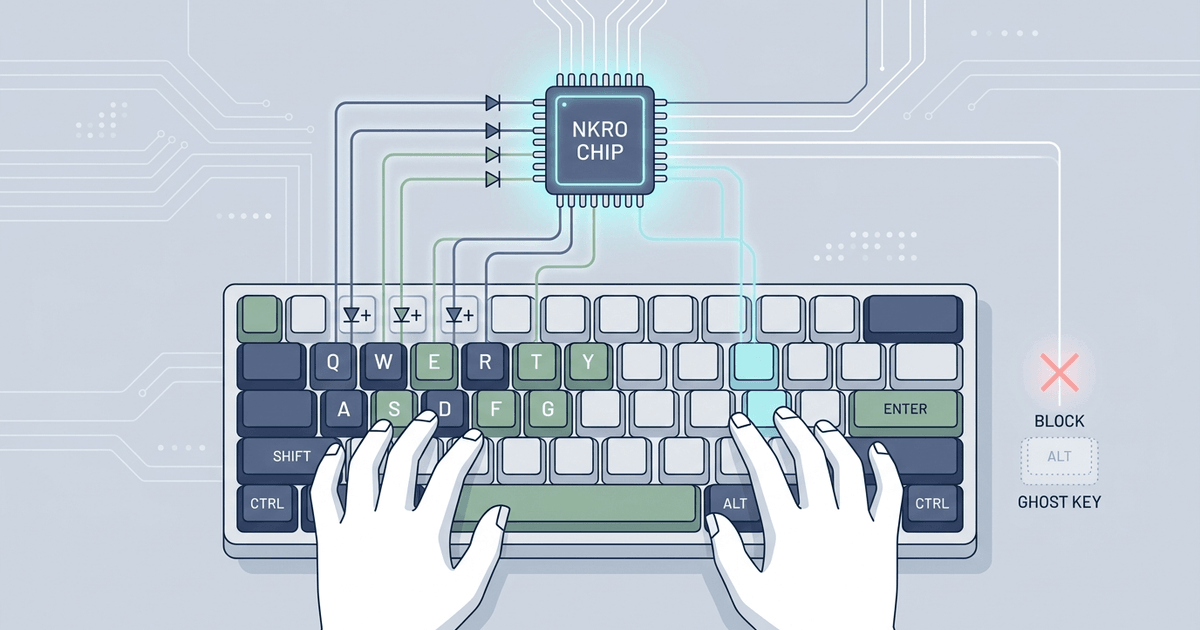
When you press three or four keys simultaneously during a fast-paced game or rapid typing session, does your keyboard drop inputs or register keys you never touched? This phenomenon—known as keyboard ghosting and matrix blocking—is one of the most misunderstood hardware bottlenecks in computer peripherals.
In this deep-dive guide, we explore the electrical physics of keyboard matrix scanning, uncover why ghosting occurs, explain how individual switch diodes enable N-Key Rollover (NKRO), and examine the USB HID protocol limitations that differentiate budget 6KRO keyboards from tournament-grade hardware.
1. What Is Key Rollover? The Core Definitions
Key rollover defines the maximum number of simultaneous keypresses a keyboard can register and report accurately to your operating system without dropping strokes or producing phantom inputs. The term originated in the mechanical typewriter era, where pressing keys faster than the typebars could retract physically jammed the machine.
Keyboards are classified by rollover tiers:
| Rollover Rating | Simultaneous Keys Recognized | Common Use Case | Ghosting Risk |
|---|---|---|---|
| 1KRO / 2KRO | 1 to 2 keys maximum | Budget office membrane keyboards | Extremely High |
| Multi-Key Anti-Ghosting | 6–10 keys in gaming clusters (WASD, Space, Shift) | Entry-level gaming keyboards | Low in WASD, High across matrix |
| 6KRO (Standard USB) | 6 alpha-numeric keys + up to 4 modifier keys | Standard USB HID peripherals | Zero (if diodes present) |
| True NKRO (N-Key) | Unlimited (all 104+ keys simultaneously) | Mechanical, Hall Effect & Optical keyboards | Completely Zero |
2. The Physics of Keyboard Matrix Scanning
To understand why keys fail to register simultaneously, you must first understand how microcontrollers read keyboard inputs. A standard full-size keyboard has 104 physical keys. If the keyboard’s microcontroller (MCU) had a dedicated input wire for every switch, it would require a massive chip with over 104 input pins, drastically increasing manufacturing costs, cable thickness, and power consumption.
Instead, engineers connect keys in an electrical grid called a matrix circuit, consisting of intersecting rows and columns.
Keyboard Matrix Grid Architecture:
               Col 0        Col 1        Col 2        Col 3
Row 0 ────┬────[ Esc ]───────[ F1 ]───────[ F2 ]───────[ F3 ]
          │        │            │            │            │
Row 1 ────┼────[  `  ]───────[  1 ]───────[  2 ]───────[  3 ]
          │        │            │            │            │
Row 2 ────┼────[ Tab ]───────[  Q ]───────[  W ]───────[  E ]
          │        │            │            │            │
Row 3 ────┴────[ Caps]───────[  A ]───────[  S ]───────[  D ]
The Scanning Cycle (Multiplexing)
- The keyboard MCU rapidly sends a brief voltage pulse down Column 0, while keeping Columns 1, 2, and 3 high-impedance (inactive).
- The MCU reads all Rows (0 through 3) simultaneously to see if any row pulled the voltage low.
- If a switch at the intersection of Row 2 and Column 1 is closed (pressed), voltage flows from Column 1 into Row 2. The MCU logs the key
<kbd>Q</kbd>. - The MCU repeats this scan cycle across all columns thousands of times per second (typically at 1,000Hz matrix polling frequency).
3. Why Ghosting Happens: The 3-Key Closed Circuit Anomaly
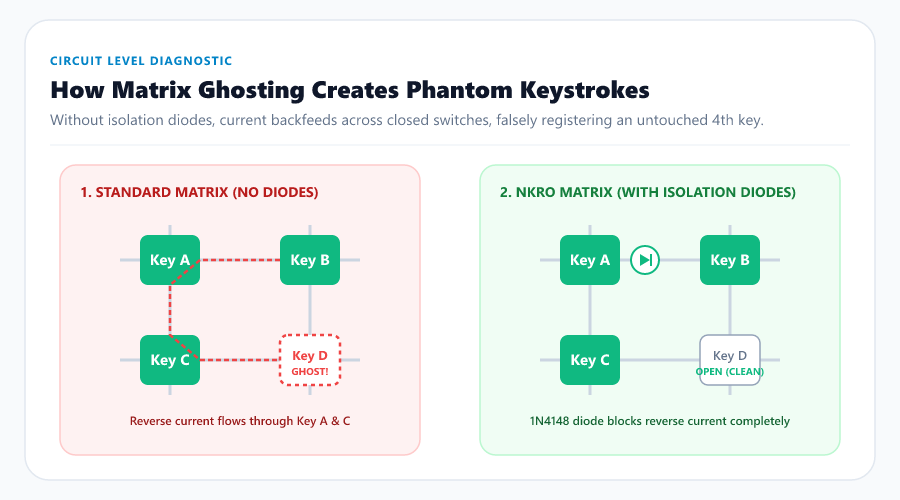
On inexpensive membrane keyboards, keys are simple momentary switches without directional current isolators. When you press two keys on different rows and columns, the microcontroller cleanly pinpoints their coordinates.
However, a serious electrical fault occurs when you press three keys that form three corners of a rectangle in the matrix grid:
The Ghosting Circuit Flaw:
               Col 1 (Active)           Col 2 (Inactive)
Row 1 ──────────[ Key A (Pressed) ]──────[ Key B (Pressed) ]
                      │                        ▲
                      │ (Backfeed Path)        │ (Phantom Current)
                      ▼                        │
Row 2 ──────────[ Key C (Pressed) ]──────[ Key D (OPEN!) ] <─── GHOST KEY!
The Ghosting Electrical Sequence:
- You press Key A (Row 1, Col 1), Key B (Row 1, Col 2), and Key C (Row 2, Col 1).
- When the MCU powers Column 2 to detect Key B, voltage flows through closed Key B into Row 1.
- Because Key A is also held closed, the voltage flows backward through Key A into Column 1.
- Because Key C is also held closed, the backfed voltage from Column 1 flows through Key C into Row 2.
- The MCU inspects Row 2. It detects voltage on Row 2 while Column 2 is active.
- The MCU erroneously concludes that Key D (Row 2, Col 2) is pressed, even though your finger never touched it!
This is a ghost key. In competitive gaming, phantom inputs can cause your character to reload, crouch, or trigger abilities by accident.
Matrix Blocking (Jamming)
To prevent phantom keys from ruining user input, budget keyboard manufacturers write firmware routines called matrix blocking or key jamming. When the MCU detects that two switches in the same column and another in the same row are pressed simultaneously, it refuses to report any further keypresses from that matrix cluster. While blocking prevents false ghost inputs, it creates dropped inputs where physical keystrokes are ignored.
4. How Anti-Ghosting Works: Isolation Diodes
To eliminate ghosting entirely, hardware designers add a physical semiconductor diode (typically a surface-mount 1N4148 or Schottky diode) in series with every single switch on the circuit board.
Diode Isolation Circuit:
Row Line ──────────[ Switch ]─────[►| Diode ]────────── Column Line
Diodes act as one-way electrical valves: current can only flow in one direction (from column to row, but never backward).
- When three switches in a rectangular cluster close, current cannot backfeed through Key A into Column 1 because the diode blocks the reverse voltage.
- The MCU reads true electrical states on every intersection without crosstalk.
- Every switch on the PCB can be pressed simultaneously without a single dropped or phantom stroke.
[!NOTE] Why don’t all keyboards use diodes? Membrane keyboards use conductive silver-ink traces printed onto thin flexible plastic sheets. Printing thousands of discrete semiconductor diodes onto flexible plastic sheets requires specialized manufacturing processes that double production costs. High-grade mechanical and optical keyboards, by contrast, use rigid fiberglass PCBs (FR-4) where automated SMD pick-and-place machines solder individual diodes at scale.
5. The USB Protocol Bottleneck: 6KRO vs. True NKRO
Having diodes on every switch solves the electrical matrix problem. However, keyboards must still transmit data to your computer over USB. Here, manufacturers encounter a second hurdle: the USB Human Interface Device (HID) specification.
The Legacy USB HID Boot Protocol (6KRO Limit)
The original USB 1.1 HID specification defined a fixed 8-byte input report format so keyboards could work in basic BIOS/UEFI environments without requiring dedicated device drivers:
USB HID 8-Byte Boot Protocol Report Structure:
Byte 0: Modifier Keys Bitmask (Ctrl, Shift, Alt, GUI - 8 bits)
Byte 1: Reserved (Always 0x00)
Byte 2: Key Code 1 (Scancode 1)
Byte 3: Key Code 2 (Scancode 2)
Byte 4: Key Code 3 (Scancode 3)
Byte 5: Key Code 4 (Scancode 4)
Byte 6: Key Code 5 (Scancode 5)
Byte 7: Key Code 6 (Scancode 6)
Because the report structure only reserves six bytes for alphanumeric key scancodes, a standard USB keyboard adhering to the boot protocol can only report six simultaneous non-modifier keys plus modifiers (Ctrl, Alt, Shift, Win/Command). If you hold down 7 letter keys simultaneously, the 7th key is dropped.
How Modern Keyboards Achieve True NKRO over USB
Modern gaming and enthusiast mechanical keyboards bypass this 6-key limitation through two primary software and firmware architectures:
- Composite Virtual Device Emulation: The keyboard presents itself to the operating system as multiple virtual USB keyboards combined under a single USB hub endpoint. Reports are split dynamically across virtual endpoints.
- Variable Bitmask Report Descriptors (True NKRO): Rather than transmitting an array of 6 scancodes, the keyboard defines a custom HID report descriptor containing a continuous bitmask array of 120+ bits. Each bit represents a specific physical key switch on the board (bit 0 = KeyA, bit 1 = KeyB, etc.). A logic
1indicates pressed, and0indicates released. In this configuration, the keyboard can report all 104+ keys simultaneously in a single 16-byte report.
6. Practical Test: How to Diagnose Your Keyboard’s Rollover
You don’t need specialized software to test your keyboard’s rollover and ghosting limits. You can test your hardware directly in your web browser:
- Open our free Online Keyboard Tester.
- Place both palms flat across your keyboard, depressing 10 to 15 keys simultaneously across different rows (e.g., Q W E R U I O P Z X C V).
- Check the visual layout:
- If exactly 6 keys illuminate green: Your keyboard is capped by 6KRO USB boot protocol limits.
- If all 12+ pressed keys illuminate green: Your keyboard supports true N-Key Rollover (NKRO).
- If unpressed adjacent keys turn amber or flicker: Your board suffers from matrix ghosting or switch chattering.
- Next, open our Keyboard Latency & Input Lag Test to compare the browser event timing for those combinations. It cannot certify sub-millisecond switch, USB, or end-to-end latency.
7. Does True NKRO Actually Matter in 2026?
A common question among typists and casual gamers is whether true NKRO is a genuine performance feature or a marketing gimmick.
For Typing
Even the fastest human typists (exceeding 200 words per minute) rarely hold more than two to three keys down simultaneously. However, fast typists who use roll-over techniques (where a new finger strikes before the preceding finger fully releases) frequently exceed 2KRO thresholds. A solid 6KRO keyboard is more than sufficient for pure touch typing.
For Competitive Gaming
In modern competitive esports, NKRO is essential. Consider a tactical shooter or rhythm game scenario:
- You are strafing diagonally: W + D (2 keys)
- You are sprinting and crouching: Shift + Ctrl (2 modifiers)
- You check the scoreboard or ping an enemy: Tab or Alt (1 modifier/key)
- You simultaneously swap weapons and activate an ability: 1 + E (2 keys)
In this common high-intensity sequence, you have depressed 7 distinct switches simultaneously. On a 6KRO or poorly designed membrane keyboard, the weapon swap or ability activation command will be dropped by the microcontroller, resulting in an untimely in-game death.
8. Summary & Buying Checklist
When purchasing your next keyboard, use this checklist to guarantee uncompromised matrix performance:
- Look for “Full N-Key Rollover (NKRO)” in specifications: Ensure it applies across the entire board, not just a “10-key anti-ghosting gaming zone.”
- Verify the actual matrix: Many keyboards use per-switch diodes or independent sensors, but switch technology alone does not guarantee NKRO. Confirm the board’s matrix, firmware mode, and USB report behavior.
- Check for BIOS / Legacy Mode Toggles: Some enterprise motherboards or older KVM switches struggle with bitmask NKRO descriptors. High-end keyboards (such as Ducky, Keychron, and Corsair) provide a quick hotkey combination (e.g.,
Fn + Nor a DIP switch) to toggle between NKRO and standard 6KRO compatibility modes. - Verify on Our Diagnostic Tool: Validate combinations that matter to you using our Online Keyboard Tester. No browser test can certify every application, game, firmware mode, or USB path.