The mechanical keyboard landscape is undergoing its biggest technological disruption in over four decades. For years, traditional mechanical switches—pioneered by Cherry MX in the 1980s—dominated gaming and enthusiast desks. But in competitive esports today, a new switch architecture has taken center stage: Hall Effect (HE) magnetic switches.
Powered by electromagnetic physics rather than colliding metal contacts, Hall Effect keyboards (spearheaded by Wooting and rapidly adopted by Razer, SteelSeries, Keychron, and DrunkDeer) introduce game-changing features like Rapid Trigger, customizable actuation points, and true 0ms debounce latency.
In this technical guide, we break down the physics behind Hall Effect sensors, examine how Rapid Trigger eliminates mechanical hysteresis, compare magnetic switches against optical and traditional mechanical switches, and benchmark real-world input latency.
1. The Physics of Hall Effect Sensors: How Magnetic Switches Work
Traditional mechanical switches operate on a binary switch principle: when you depress a key stem, a plastic cam forces a flexible metal leaf into direct physical contact with a stationary leaf, completing an electrical circuit.
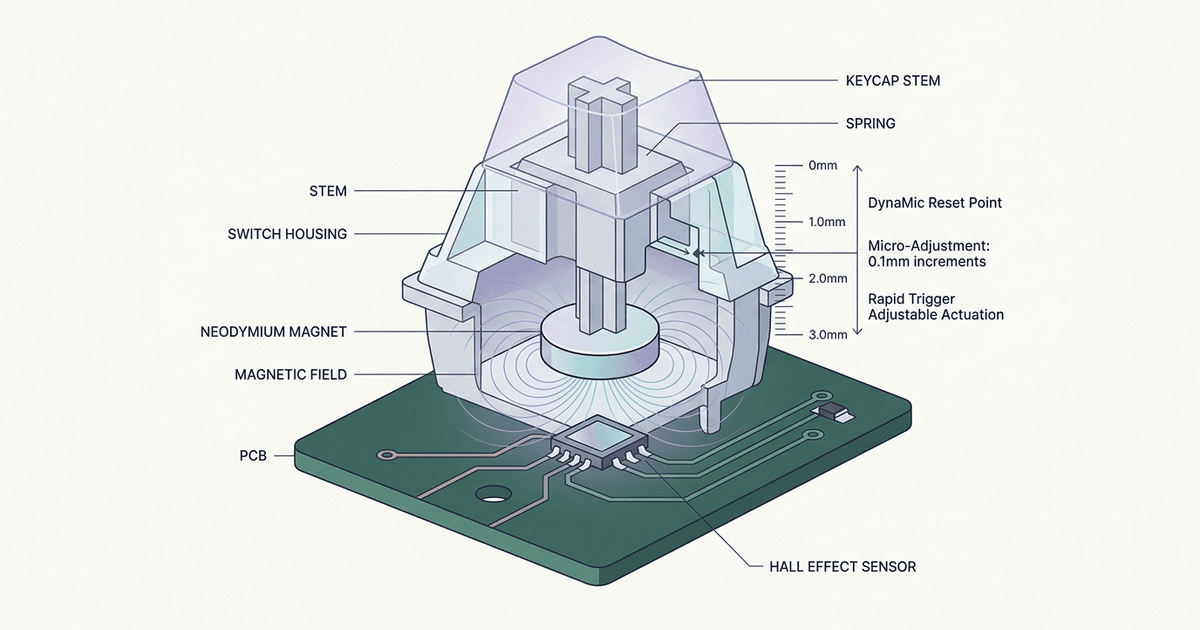
Hall Effect switches, by contrast, are completely contactless. Inside each switch housing:
- A tiny permanent neodymium magnet is embedded directly inside the movable plastic stem.
- A specialized Hall Effect semiconductor sensor is soldered directly onto the keyboard’s circuit board (PCB) immediately below each switch socket.
- When the key is at rest (unpressed), the magnet sits 4.0mm away from the sensor. The magnetic flux density reaching the sensor is minimal.
- As your finger depresses the keycap, the magnet moves downward toward the PCB sensor.
Hall Effect Switch Electromagnetic Architecture:
[ Keycap & Stem ]
       │
   [ [ N/S ] ] <── Permanent Neodymium Magnet
       │   ▲
       │   │ Magnetic Flux Lines (B)
       ▼   ▼
[ Hall Sensor Chip ] <── Detects Voltage Shift (VH)
═══════════════════════ (Keyboard PCB Surface)
The Lorentz Force Principle
When an electrical current flows through the Hall sensor semiconductor chip, the magnetic field $(B)$ created by the approaching stem magnet exerts a Lorentz force on the passing electrons. This deflects electrons toward one edge of the chip, creating a measurable electrical potential difference across the semiconductor known as the Hall Voltage $(V_H)$.
An analog-to-digital converter (ADC) on the keyboard’s microcontroller continuously measures this voltage thousands of times per second. Because the Hall Voltage is directly proportional to the physical distance between the magnet and sensor, the keyboard does not simply know if a key is pressed—it knows precisely how many millimeters (to within 0.1mm accuracy) the key has traveled at every millisecond of its stroke.
2. What Is Rapid Trigger? Eliminating Mechanical Hysteresis
The headline innovation that made magnetic keyboards indispensable in competitive gaming (especially in tactical shooters like Valorant, Counter-Strike 2, and Apex Legends, as well as rhythm games like osu!) is Rapid Trigger.
The Problem with Traditional Switches: Fixed Hysteresis
On a standard mechanical switch (like a Cherry MX Red):
- Fixed Actuation Point: The switch activates when pressed down past 2.0mm of travel.
- Fixed Reset Point: To press the key again, you must release your finger until the stem travels back upwards past the reset point (typically 1.5mm to 1.8mm).
The distance between the actuation point and reset point is known as hysteresis. If your finger vibrates or rapid-taps near the bottom of the key travel without lifting past 1.5mm, the switch cannot reset, and your subsequent tap will be dropped.
Traditional Mechanical vs. Rapid Trigger Comparison:

TRADITIONAL MECHANICAL SWITCH:
[ 0.0mm ] Rest Position
[ 1.5mm ] ─── Fixed Reset Point ──────────────── (Must release past this line!)
[ 2.0mm ] ─── Fixed Actuation Point ──────────── (Must press past this line!)
[ 4.0mm ] Bottom Out

RAPID TRIGGER (HALL EFFECT):
[ Any Depth ] ─── Current Position (e.g., 3.2mm)
                  │
                  ├── Moves UP by 0.1mm ──> INSTANT RESET! (Character stops immediately)
                  └── Moves DOWN by 0.1mm ─> INSTANT ACTUATION! (Fires immediately)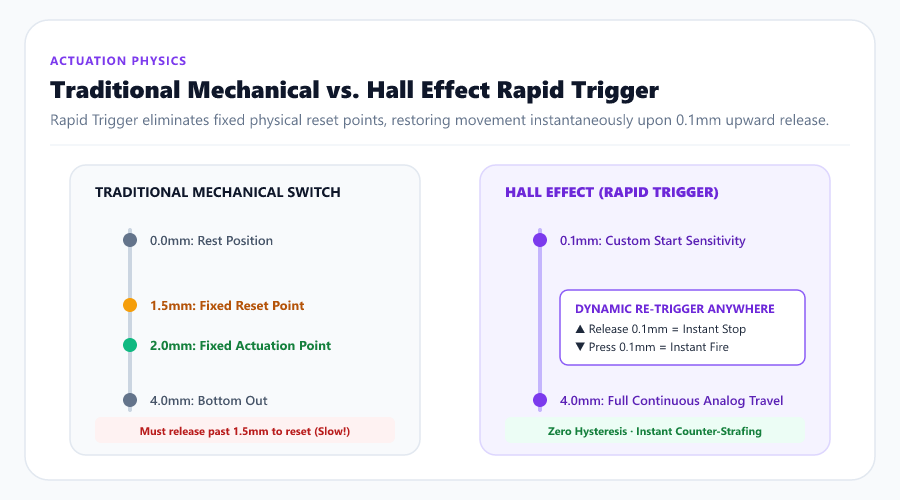
The Rapid Trigger Revolution
Because Hall Effect keyboards measure continuous analog travel, firmware does not rely on fixed physical reset points:
- The instant the switch begins moving upward by as little as 0.1mm, Rapid Trigger dynamically resets the key.
- The instant you press back down by 0.1mm, the key re-actuates immediately.
Competitive Gaming Impact: Counter-Strafing
In Counter-Strike 2 and Valorant, maximum weapon accuracy requires your character to come to a complete dead stop (“counter-strafing”) before firing:
- On a traditional mechanical keyboard, letting go of the D key takes 15ms to 30ms for the switch spring to push the key back up past the 1.5mm reset threshold.
- With Rapid Trigger set to 0.1mm sensitivity, releasing your finger cuts movement input in under 1ms, stopping your character instantaneously and giving you an insurmountable first-bullet accuracy advantage.
3. Analog Actuation: Dynamic Keystroke Depth Mapping
Beyond Rapid Trigger, Hall Effect technology turns your keyboard into an analog controller:
1. Fully Adjustable Actuation (0.1mm to 4.0mm)
In traditional keyboards, actuation is baked into the switch mold. With Hall Effect, companion software allows you to configure actuation sensitivity per-key:
- Set your movement keys (W, A, S, D) to an ultra-sensitive 0.2mm for instantaneous twitch reflexes.
- Set high-penalty ability or ultimate keys (Q, R) to a deeper 2.5mm to eliminate accidental misclicks.
2. Dual-Action Actuations (Dynamic Keystroke)
Because the sensor tracks exact depth, you can bind multiple commands to a single physical keypress:
- Press lightly (1.0mm) to Walk.
- Bottom-out the key completely (3.8mm) to Sprint.
- On key release, automatically execute a secondary command (e.g., throw a grenade upon releasing the key).
4. Comprehensive Comparison Matrix: Hall Effect vs. Optical vs. Mechanical
| Technical Parameter | Hall Effect (Magnetic) | Optical Infrared | Traditional Mechanical |
|---|---|---|---|
| Sensing Mechanism | Continuous Hall Voltage $(V_H)$ | Infrared Light Beam Break | Metal Contact Leaf Collision |
| Actuation Point | Fully Adjustable (0.1mm–4.0mm) | Fixed (or 2-point step) | Fixed (1.2mm–2.2mm) |
| Rapid Trigger Support | Full Dynamic (0.1mm step) | Limited / Simulated | None (Hardware Impossible) |
| Debounce Delay | 0ms (Zero contact bounce) | 0ms (Optical) | 5ms to 15ms (Contact chatter) |
| Switch Lifespan | 100+ Million Clicks | 100+ Million Clicks | 50–80 Million Clicks |
| Liquid & Dust Resistance | High (Sensors coated on PCB) | Susceptible to sensor dust | Susceptible to contact oxidation |
| Sound & Feel | Ultra-smooth (No leaf friction) | Smooth (Light leaf tick) | Tactile, Clicky, or Linear options |
| Price Point | Premium ($120–$250+) | Moderate ($80–$160) | Budget to High-End ($30–$200) |
(For an in-depth breakdown of how Hall Effect ADC sampling rates compare against USB report rates in end-to-end input delay, see our complete guide on Keyboard Polling Rate vs. Scan Rate vs. Latency.)
5. Real-World Quirks: Temperature & Calibration
While Hall Effect technology offers staggering performance benefits, it introduces unique physical characteristics users should understand:
Thermal Drift and Magnetic Interference
Neodymium magnets are sensitive to temperature changes. When room temperatures fluctuate significantly (e.g., from a cold winter room to heavy PC gaming exhaust blowing across your desk), magnetic field strength shifts slightly. High-end magnetic keyboards incorporate continuous auto-calibration algorithms in their firmware that recalibrate sensor baselines every few seconds to prevent key “drifting.”
Stray Ferromagnetic Objects
Placing high-powered external magnets, cell phones with MagSafe rings, or metal screwdrivers directly onto a Hall Effect keyboard can alter the local magnetic field and trigger false keystrokes.
6. How to Measure Input Lag on Your Keyboard
To measure the latency difference between your mechanical and magnetic keyboards:
- Launch our Keyboard Latency & Input Lag Test.
- Run a 30-keystroke test tapping as lightly and quickly as possible.
- Inspect your Keypress Duration and Effective Scan Rate.
- Standard mechanical keyboards typically record human tap durations between 45ms and 80ms due to physical debounce stabilization windows.
- Hall Effect keyboards equipped with Rapid Trigger routinely register micro-taps between 15ms and 30ms, shaving tens of milliseconds off human reaction pipelines.
- Check for stuck or chattering keys using our Online Keyboard Tester as a browser-level diagnostic; it cannot certify the switch or controller’s long-term electrical health.
7. The Verdict: Who Needs Hall Effect in 2026?
Essential For:
- Competitive FPS Players (Valorant, CS2, Overwatch 2, R6 Siege): Rapid Trigger counter-strafing provides a definitive, measurable competitive advantage.
- Rhythm Game Enthusiasts (osu!, Etterna): Instantaneous dynamic resets allow unprecedented tap speeds without dropped notes.
- Heavy Typists Seeking Extreme Durability: Contactless design means zero metal leaves to oxidize, bend, or suffer from switch chatter.
Optional For:
- Casual Gamers & Office Typists: If you primarily play MOBAs, RPGs, or write prose, traditional mechanical switches (such as Cherry MX, Gateron Oil Kings, or Kailh Box switches) offer a wider variety of rich acoustic profiles (thock, clack) and satisfying tactile bumps that linear magnetic switches cannot fully replicate.